Edit in 5 Minutes, Escalate in 2 Weeks: Houzz Review Removal for Pros
Houzz will remove a review only when it violates the platform’s Review Policy, meaning it’s fake, duplicated, harassing, or exposes private information...
Houzz will remove a review only when it violates the platform’s Review Policy, meaning it’s fake, duplicated, harassing, or exposes private information; genuine client feedback almost always stays up. If you wrote the review, edit or delete it through your account settings. If you’re the business owner disputing someone else’s post, gather your documentation and file a report through Houzz support.
TL;DR:
- Houzz only removes reviews that violate policies such as fake, harassing, or private information, while genuine opinions based on real experiences usually remain.
- Reviewers can edit or delete their own posts through their account, but business owners must provide documentation and report policy violations via Houzz support.
- Reporting a review requires clear evidence of policy breaches like impersonation, threats, or false claims, and success depends on how well the violation aligns with Houzz’s criteria.
- Most legitimate negative reviews that won’t be removed can be countered with a professional, courteous public reply demonstrating good customer service practices.
- For reviews that are clearly fraudulent, defamatory, or contain private data, hiring an attorney-led removal service is recommended to pursue legal recourse efficiently.
Table of Contents
- What Does Houzz’s Review Policy Actually Protect?
- How Do I Edit or Delete a Review I Posted on Houzz?
- How Do I Report a Houzz Review That Violates Policy?
- What Should You Do If Houzz Won’t Remove the Review?
- When Is It Worth Escalating Beyond Houzz’s Own Process?
- What I’d Actually Do First
- When Hiring a Professional Makes Sense
- Sources
- FAQ
What Does Houzz’s Review Policy Actually Protect?
Houzz built its review system to protect real client experiences, not to shield businesses from criticism. The platform’s Review Policy treats reviews as user content and draws a firm line around what crosses into removable territory.
Content that typically qualifies for removal includes:
- Defamatory statements presented as fact rather than opinion
- Harassment, threats, or hate speech directed at a business or individual
- Personal information (phone numbers, addresses, financial details) posted without consent
- Spam, duplicate postings, or reviews from accounts with no verifiable connection to a project
- Attempts to use a review as leverage to demand a refund or payment
What doesn’t qualify: a client saying the tile work was uneven, the project ran two weeks late, or communication felt slow. Those are opinions grounded in a real experience, and Houzz protects them even when they sting. The distinction matters because most removal requests fail not from a lack of effort but from targeting a review that’s simply unflattering rather than policy-violating. Houzz’s own pro-help guidance states plainly that it won’t remove reviews from genuine past clients who comply with the policy.
How Do I Edit or Delete a Review I Posted on Houzz?
If you’re the reviewer and want to change your own words, the process runs entirely through your account. No support ticket required.
- Log in to your Houzz account and go to your Activity tab.
- Click Your Reviews to see everything you’ve posted.
- Select Read More on the review you want to change.
- Click Edit Review, make your changes, or clear the text entirely if you want to delete a review posted in error.
- Check the submit box and confirm to save the update.
This exact flow has been confirmed in Houzz’s own user discussions, where support reps walk reviewers through the same sequence.
Locked out of the account you used? Try a password reset with the email you originally registered. If that email is dead or you can’t remember which account you used, contact Houzz support directly and explain the situation. They can often locate the review tied to your project and verify ownership before making changes on your behalf. A common snag: people sign up under a work email that gets deactivated after they change jobs, then can’t recover access years later when they want to edit an old post.
How Do I Report a Houzz Review That Violates Policy?
Reporting someone else’s review is a different process. It runs through Houzz’s dispute channel rather than an account edit screen.
- Locate the review on your Houzz Pro profile and click the flag or “report” option next to it.
- If no direct flag appears, use the Houzz support contact form to open a dispute.
- State clearly which policy clause the review violates (spam, fake account, harassment, private information).
- Attach your documentation and submit.
Before you submit anything, build your evidence file. Reputation specialists who handle these disputes regularly recommend a tight documentation checklist:
- Contract or project dates that show timeline discrepancies
- Invoice or order numbers proving (or disproving) a client relationship
- Screenshots of the review with visible timestamps
- Evidence of impersonation, duplicate accounts, or coordinated fake posting
- Message threads showing harassment, threats, or extortion attempts
Pro Tip: Keep your report to one tight paragraph naming the exact policy clause violated, followed by a bullet list of your evidence. Houzz staff review dozens of these a day. Reports that require them to hunt for the violation get deprioritized.
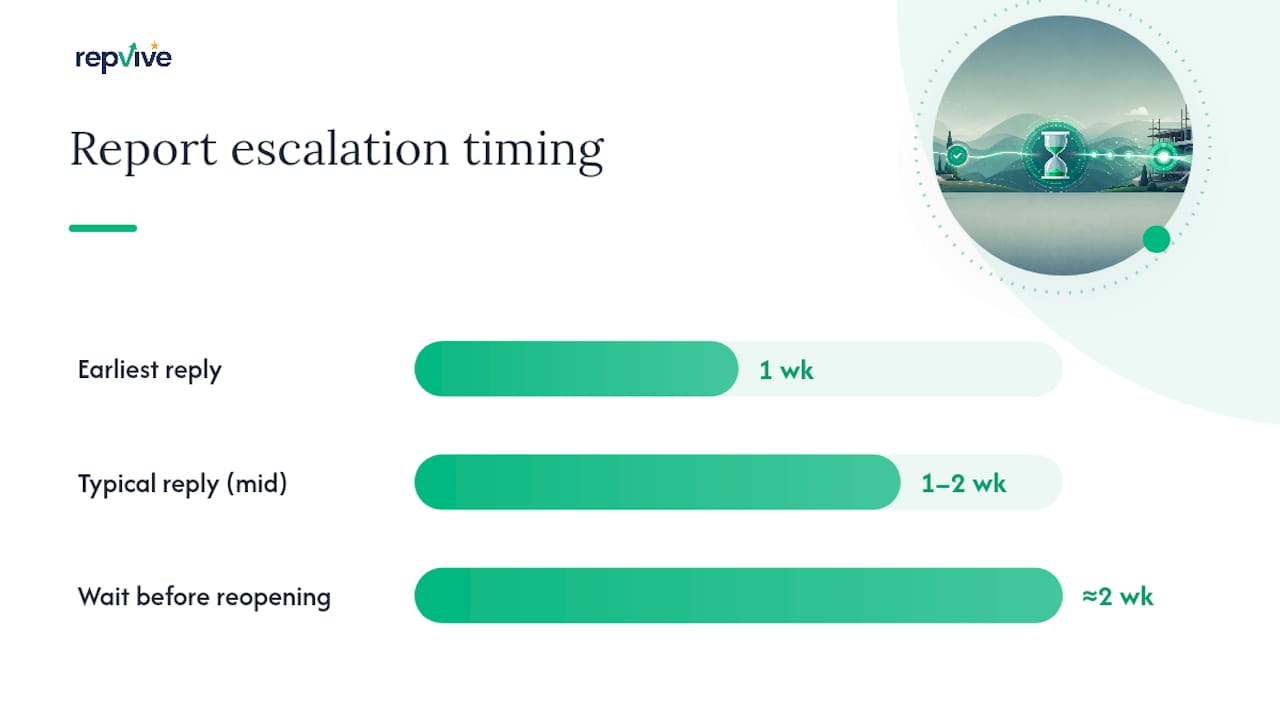
Response times vary, but most reporters hear back within a week or two.
Removal success tracks closely with how clearly the violation matches Houzz’s policy language rather than how unfair the review feels to you.
Cases that tend to succeed:
- Reviews from accounts with no verifiable project history (fake accounts)
- Duplicate posts of the same complaint across multiple profiles
- Content that doxxes an owner or employee
- Reviews containing threats or unlawful content
Cases that rarely succeed:
- A client is annoyed and writes an unflattering but factual account
- A one-star rating with no detailed explanation
- A dispute over pricing or scope the client felt was unclear
Outcomes fall into four buckets: full removal, partial redaction (Houzz strips out a specific line but leaves the rating), account suspension for the reviewer, or no action at all. Reputation Rhino’s analysis of the removal process notes that clean, well-documented reports tied to a specific policy clause get the fastest resolution.
If Houzz declines your first report, wait roughly two weeks before reopening it, and add any new evidence you’ve gathered in the interim rather than resubmitting the identical complaint.
What Should You Do If Houzz Won’t Remove the Review?
A legitimate negative review that won’t come down isn’t the end of the story. It’s a chance to show future clients how you handle a problem.
- Reply publicly, briefly, and without defensiveness: acknowledge the specific issue, describe what you did or will do about it, and offer a direct contact method for resolution.
- Ask satisfied recent clients for reviews so a handful of critical posts don’t dominate your profile.
- Set up alerts or check your profile weekly so new reviews get a reply within days, not months.
Pro Tip: A prompt, professional reply to criticism often reassures prospective clients more than a page of five-star reviews would on its own, since it shows how you actually behave when something goes wrong.
For a deeper breakdown of tone and structure, see this guide on handling a difficult client review and this piece on building a long-term reputation strategy.
When Is It Worth Escalating Beyond Houzz’s Own Process?
Some reviews cross a line that a support ticket can’t fix. If a post makes a false factual claim that damages your business (not just a bad opinion), discloses private information, or impersonates a real client to post fabricated content, you may be looking at defamation or privacy invasion, not just an unfair rating. Our guide to responding to defamatory reviews walks through how to document that kind of claim.
An attorney-led removal service typically handles this differently than a standard support dispute: custom legal claims tied to the specific violation, direct escalation channels with the platform, a pay-per-removal structure, and a dashboard tracking each case. Before hiring anyone, check for:
- A documented, step-by-step process instead of vague promises
- Clear terms on when you’re actually charged
- No demand for a large payment before anything is removed
What I’d Actually Do First
If you posted the review yourself and just want it gone, the account edit path takes five minutes. No need to overthink it.
If you’re the business owner, the fastest real progress comes from matching your complaint to an exact policy clause and documenting it before you file anything. Most owners skip straight to outrage and skip the paperwork, which is exactly backwards. For the narrow set of cases involving defamation or coordinated fake reviews, an attorney-led service like Repvive exists precisely because platform support queues aren’t built for legal nuance.
, Jason
When Hiring a Professional Makes Sense
If you’ve filed a report, waited the two weeks, added your documentation, and Houzz still won’t budge on a review that’s clearly fake, defamatory, or built on stolen personal information, that’s the point where DIY reporting stops being the efficient move.
A professional attorney-led removal service typically drafts a custom legal claim for each disputed review instead of sending a generic takedown request, with cases often running on a pay-per-removal model, meaning payment is required only after successful removal. Progress can be tracked on a real-time dashboard rather than waiting uncertainly in a queue. Such services may cover more than 20 review platforms, helping businesses deal with disputes on multiple sites like Houzz, Google, Yelp, and Trustpilot.
If your review qualifies as defamatory, privately identifies someone, or comes from a fabricated account, start a consultation with Repvive and let their legal team assess whether your case has a real path to removal.
Sources
FAQ
How Do I Remove a Review I Posted on Houzz?
Log in, go to Activity, select Your Reviews, click Read More on the post, then Edit Review to change or clear the text and resubmit.
Can I Delete a Review I Left on a Booking or Project Platform Like Houzz?
Yes, on Houzz you can delete your own review by editing it down to blank text and confirming the submission; other booking platforms may have similar self-service edit options tied to your account.
How Do I Unsubscribe From Houzz Email Notifications?
Go to your account notification settings and turn off marketing or activity emails individually; this stops future messages without affecting your existing reviews or profile.
How Do I Delete My Houzz Profile Entirely?
Contact Houzz support directly through their contact form to request full account deletion, since this option isn’t typically available as a self-service setting.
Will Houzz Remove a Review Just Because It’s Negative?
No. Houzz protects reviews from genuine clients even when the feedback is critical; removal only happens when the content violates a specific policy clause like defamation, harassment, or fake account activity.